TV Mount Height: Start at Seated Eye Level
· 11 min read
As an Amazon Associate we earn from qualifying purchases. We work from published measurements and buyer reports, and say so where it matters. If you buy through our links we may earn a commission; it has no bearing on the numbers or the verdict.
Why the two published methods disagree by up to 50 cm
Set the screen centre at your seated eye level, measured in the chair you actually watch from, then add a correction for how far back that chair sits. That is the whole of it. And it is why two reputable manufacturers publish numbers for a 65-inch set that differ by up to half a metre.
Vogel's, in guidance published 27 June 2025, puts the centre of a 65-inch screen roughly 100 to 120 cm off the floor. The same page gives 105 to 152 cm as the range where the centre usually lands when it sits at or slightly below seated eye level. KEF, writing on 27 November 2025, gives a formula instead: seated eye level plus 22% of the viewing distance. Its worked example, a 36-inch eye level at a 109-inch viewing distance, lands that same screen's centre at 60 inches, or 152.4 cm.
What the discrepancy costs you
That is 32 to 52 cm above Vogel's range for an identical panel. Neither page acknowledges the other or explains the gap. A mount that fixes the height at install gives you no way back. What follows lets you take four measurements, run both methods on your own room, and know which answer to use.
How viewing distance drives the split
Why the gap opens
The two methods are not measuring the same thing. KEF's number scales with distance, because 22% of 109 inches is 24 inches of rise; at half that distance the correction halves. The per-size figures from Vogel's do not take a viewing distance as an input, though that guidance does say to mount lower when seating is closer to the screen.
The arithmetic suggests a practical rule. Close in, the distance term is small and the two methods sit nearer each other; further back, the distance term grows and pushes the formula's answer above the per-size figures. Note that 109 inches is close to the 9 feet KEF recommends for a 65-inch panel.
| Product | Material | Color | Mfr Part Number | Enclosure Material | Right for |
|---|---|---|---|---|---|
| SANUS Height | Alloy Steel | Black | VMF822-B2 | Alloy Steel | Best post-install adjustment |
| Mount-It! | Alloy Steel | Black | MI-444BLK | Alloy Steel | Best pull-down height |
| SANUS Tilting | Metall | Black | VLT7-B2 | Metall | Best tilt correction |
| SANUS Full | Alloy Steel | Black | VLF728-B2 | Alloy Steel | Best off-axis seating |
| Amazon Basics | Metal | Black | XD2625P | Metal | Best single-stud budget |
| XINLEI No Stud | Metal | Black | MF81 | Metal | Best for renters |
| JINJIANNING | — | One Color | — | — | Best ceiling mount |
| POLGDW | — | — | — | — | Best large-screen drop |
| Multifunction | — | — | JJysjy167429 | — | Best cable concealment |
Every spec above is quoted from the listing; the “Right for” column is our judgement.
The short version
- The pick: SANUS Height, for you want to fine-tune the screen to seated eye level after the mount is already on the wall, without re-drilling.
- Also worth it: Mount-It!, for your TV has to sit above a fireplace or high shelf and you need to pull it down to seated eye level for viewing.
- How this was decided: published specifications and buyer reports across 9 products, compared below.
Four measurements to take before you drill
Take a tape measure, not a guess.
Four numbers decide the mount height. Take all four before the drill comes out, because the second one changes the answer more than screen size does.
- Seated eye level, in your real posture. Sit in the seat you actually watch from, reclined and settled into the cushions, and have someone measure floor to pupil. KEF is explicit that a reclined posture yields a different eye level than sitting upright, so measuring while perched forward gives you a number you will never use. KEF does not quantify the difference between upright and reclined eye level.
- Viewing distance, seat to screen wall. KEF defines it that way and recommends the diagonal multiplied by 1.67: 7.5 feet (229 cm) for a 55-inch, 9 feet (274 cm) for a 65-inch, 10.5 feet (320 cm) for a 75-inch. Vogel's makes the same point from the other direction. Sit close and the picture should align more closely with eye level.
- Every regularly used seat, then the average. Where seating runs to more than one row, including a rear row on a riser, KEF says to average the eye-level heights and feed the average into the calculation. Rows on a riser fall inside that averaging instruction.
- The most-used seat, as a weighting. Vogel's takes the most-used seat as the reference point, and does not say how to combine an average with it.
For the distance side of this, our TV size and viewing distance guide works the same arithmetic backwards from the screen you own.
From your measured eye level to a centre height
Take your measured seated eye level and add 22% of the viewing distance. That is KEF's formula. Vogel's also starts from seated eye level in the actual viewing seat, but publishes per-size ranges rather than a calculation. Viewing distance here means seat to screen wall, as KEF defines it.
KEF's own worked example: a 36-inch seated eye level at a 109-inch viewing distance puts a 65-inch centre at 60 inches, or 152.4 cm from the floor.
Run the formula against your own eye level at the distances KEF recommends for each size, 7.5 ft for 55 inches, 9 ft for 65, 10.5 ft for 75:
Now compare the range method. Vogel's puts a 55-inch centre at 100 to 110 cm and a 65-inch at 100 to 120 cm. At 90 inches of distance, a 36-inch eye level lands at 142 cm, about 22 cm above the top of that 65-inch band. A tilting mount is the recommended fix whenever the panel sits higher than seated eye level, but no source says how much height difference a tilt can absorb. At 126 inches the same eye level gives 162 cm, further still above the band.
The two methods therefore diverge more the further back you sit; no source states at what distance one should be preferred over the other. Our TV size and viewing distance guide covers the distance input in more detail.
Which one is yours
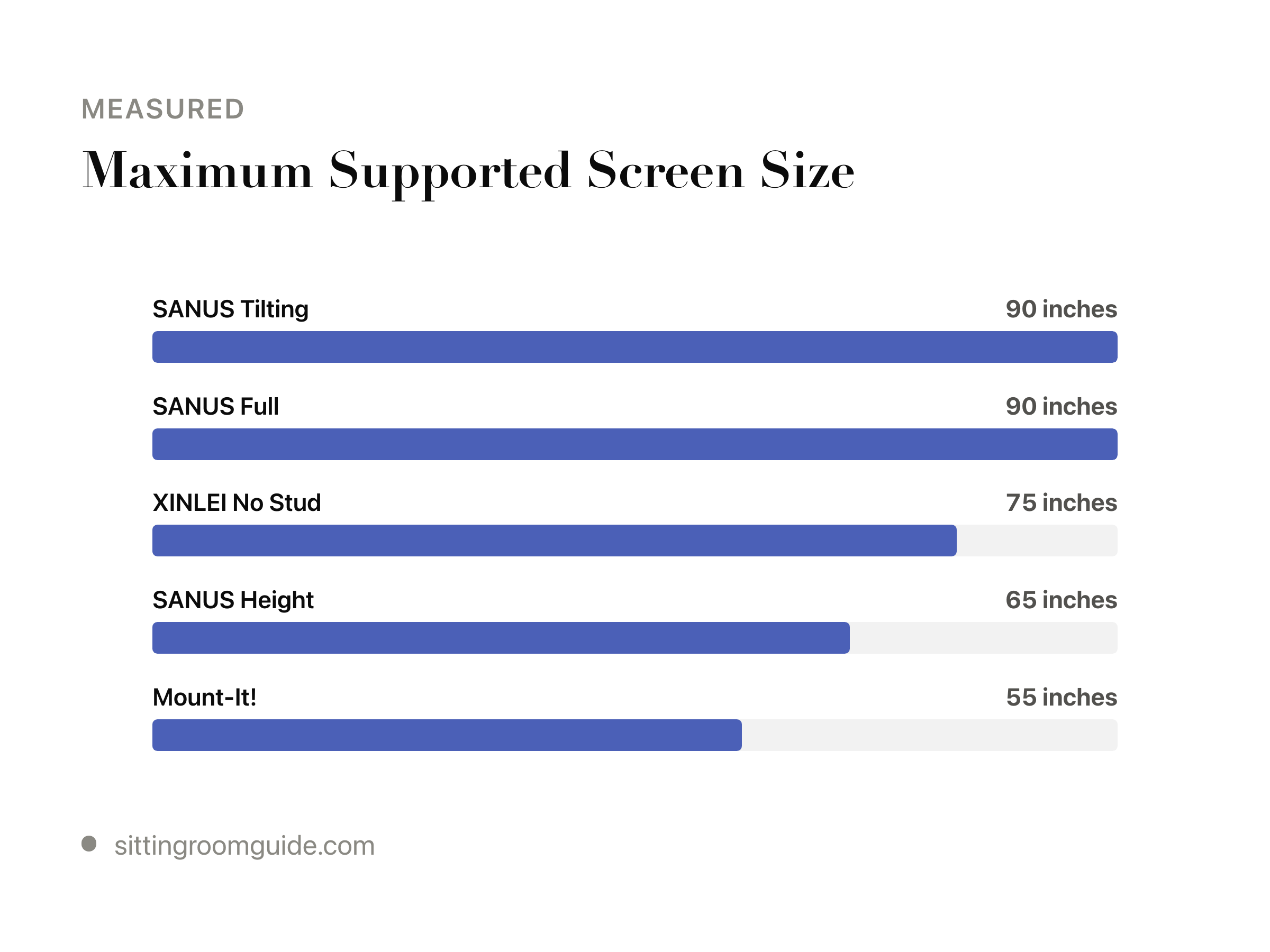
- Least maximum supported screen size: Mount-It! at 55 inches.
- The middle of the range: XINLEI No Stud at 75 inches.
- Most maximum supported screen size: SANUS Full at 90 inches, worth it for seats are spread across a wide or off-centre room.
Where a single fixed height breaks, and the mount that rescues each case
Any single published height figure assumes a particular seated eye level and viewing distance. Vogel's is explicit that there is no one universal correct bracket height, and that seated eye level in the actual viewing seat is the starting reference. Five seating situations pull away from a single figure, each in a different direction.
- Low-slung sectionals and floor seating lower seated eye level, which pulls the target centre height down with it; no source in this evidence file specifies mounts with post-install vertical travel or their range.
- Bar stools and kitchen counters invert the problem. The viewer is perched or standing, so eye level lands above the centre of the glass and the picture needs aiming upward or raising. Kitchens are named as one of the three cases where the set ends up higher than eye level, alongside bedrooms and fireplaces.
- Beds are a case Vogel's names directly, reporting a common bedroom centre height of around 60 inches, the top of its own recommended range. A tilting wall mount is the recommended answer whenever the panel has to sit higher than seated eye level.
- Above-fireplace positions are one of the three positions said to end up above eye level. Mount-It! lists only four pull-down mounts against 73 full-motion, and sells pull-down fireplace mounts at $219.99 and $249.99 plus a motorized fireplace mount at $349.99.
- Riser rows and split seating give more than one eye level at once; KEF says to average them. Full motion is called the best solution where viewing happens from a couch plus a dining table.
Getting it wrong is not cosmetic. A panel too high or too low forces you to tilt your head, which Vogel's says leads to neck and eye fatigue over time.
Did you get it right? Check after the screen is on the wall
Sit down before you tidy up. Put the tape measure back on the wall, floor to centre, and compare it against the seated eye level you recorded earlier. That pair of numbers is what Vogel's names as the measurement to take: floor to screen centre, against seated eye level. The stated cost of mounting too high or too low is head-tilting, plus neck and eye fatigue over time. No threshold is given past which it applies.
Large panels need a second, different check. On 75 and 77-inch sets, Vogel's says your gaze should land on the centre or the lower third of the glass, not on the geometric centre. A 75- or 77-inch set goes at around 120 to 140 cm, depending on seating position and viewer height.
SANUS Height — Best post-install adjustment
- Twist-handle height shift moves the screen up or down 3 inches after installation, a 6-inch adjustment range
- Single-stud design gives more freedom over where the plate lands, including corners
- But: Capped at 32-65 in. screens and 70 lbs, so large panels are out
- But: Only 10 degrees of tilt, less than dedicated tilting mounts
Mount-It! — Best pull-down height
- Gas spring handles vertical pull-down travel for high mounting positions
- -15 to +5 degree tilt and 180 degree swivel
- But: 50.6 lbs capacity and 23-55 in. screen range rule out most large TVs
- But: Max VESA 400x400mm
SANUS Tilting — Best tilt correction
- Up to 15 degrees of tilt to aim a high-mounted screen down at seated viewers
- Handles 42-90 in. TVs, the widest screen range of the wall mounts here
- But: Tilt only — no swivel or height change once mounted
- But: No vertical adjustment, so the stud position dictates the height
SANUS Full — Best off-axis seating
- Full articulation: extend, swivel and tilt up to 57 degrees
- Supports 42-90 in. TVs up to 125 lbs
- But: 38 lb mount weight makes solo installation awkward
- But: No dedicated height adjustment — the arm changes angle, not the mount's level
Amazon Basics — Best single-stud budget
- Single-stud fixing suits concrete, brick and wood walls
- Swivel and tilt to compensate when the stud sits too high or low
- But: Limited to 26-55 in. screens and 80 lbs
- But: Only 15 degrees of tilt and no height adjustment
XINLEI No Stud — Best for renters
- Wall plate nails into drywall or plaster with a hammer — no stud finding, drilling or anchors
- Placement is not dictated by stud spacing, so the screen can land at seated eye level
- But: Fixed mount — no tilt or swivel to correct a height mistake
- But: Nail-in drywall fixing leaves a row of holes and demands a sound wall surface
JINJIANNING — Best ceiling mount
- Double-pole design with screw-set height adjustment along the drop
- 0 to 30 degrees of tilt to aim a high drop down at seated viewers
- But: Height changes are made by screws, not a lever, so it is not a quick day-to-day adjustment
- But: Ceiling fixing means the drop height is largely committed at install
POLGDW — Best large-screen drop
- Max VESA 1000x600mm covers wide bolt patterns on big panels
- Rated to 100 kg on cold-rolled steel poles with an enlarged, thickened base
- But: Listing gives conflicting screen ranges (55-86 in. in the title, 60-120 in. in the detail)
- But: Adjustment is tool-based, not tool-free
Multifunction — Best cable concealment
- Cables route inside the centre tube for a clean drop
- Telescopic poles with height adjustment plus tilt
- But: 60 kg limit is lower than the other ceiling poles here
- But: Generic listing gives no VESA figure, so bolt-pattern fit must be checked
If the number is wrong
What you can do about it depends on what you bought. Mount-It!'s own catalogue is weighted toward adjustment: 73 full-motion and 42 tilting mounts against 20 fixed and 4 pull-down. A fixed bracket gives you no correction after install, so measure twice there.
Neither Vogel's nor KEF addresses the roughly 50 cm disagreement between their 65-inch figures, so the safest move is to measure your own seated eye level and distance and choose a mount that allows adjustment afterwards.
Which one, then?
SANUS Height, best for you want to fine-tune the screen to seated eye level after the mount is already on the wall, without re-drilling.
A different situation changes the pick:
- For your TV has to sit above a fireplace or high shelf and you need to pull it down to seated eye level for viewing: Mount-It!.
- For the TV must hang higher than ideal and you want to angle the picture down toward the sofa while keeping it close to the wall: SANUS Tilting.
- For seats are spread across a wide or off-centre room and the screen has to be aimed differently depending on where people sit: SANUS Full.
Before you order the SANUS Height: capped at 32-65 in. screens and 70 lbs, so large panels are out
Questions
How high should a 65 inch TV be from the floor?
Two published answers exist. Vogel's puts the centre of a 65-inch screen 100 to 120 cm off the floor. KEF's formula, seated eye level plus 22% of viewing distance, gives 152.4 cm from a 36-inch eye level at 109 inches. Measure your own eye level and choose between them.
Should the centre of the TV be at eye level or the top of the screen?
The centre. Both Vogel's and KEF start from the centre of the panel set at or slightly below seated eye level. The exception is very large screens: on 75 and 77-inch sets, Vogel's says your gaze should land on the centre or the lower third of the glass.
How do I measure my seated eye level?
Sit in the seat you actually watch from, reclined and settled into the cushions, then have someone measure from the floor to your pupil. KEF notes a reclined posture gives a different eye level than sitting upright, so measuring while perched forward produces a number you will never use.
Does viewing distance change how high the TV should be?
Yes. KEF adds 22% of viewing distance to seated eye level, so the correction grows the further back you sit and shrinks when you sit close. Vogel's does not take distance as an input but still advises mounting lower when seating is closer to the screen.
What if two rows of seats need different TV heights?
KEF says to average the seated eye-level heights of every regularly used seat, including a rear row on a riser, and feed that average into the calculation. Vogel's instead uses the most-used seat as the reference. Where seating splits between couch and dining table, a full-motion mount is recommended.
Sources
- Find Your Ideal TV Mounting Height – Mount-It! accessed 2026-08-04
- Right TV wall height for your television | Vogel's accessed 2026-08-04
- How to calculate the ideal height of a TV – KEF Europe accessed 2026-08-04